



—
News
The robot-polished “laundry board” nightmare: How can “vibration patterns” be completely eradicated?
Release time:
2025/11/14
At robot-polishing project sites, nothing gives engineers more headaches than “vibration marks.”
These “vibration patterns” are not merely an aesthetic issue—they signify:
- Quality does not meet standards. The surface roughness significantly exceeds the standard, and the product is directly scrapped.
- Inefficiency You have no choice but to slow down and make repeated repairs, and neither the yield nor the takt time can meet the targets.
- Consumables and Equipment Damage Vibration can rapidly deplete abrasive materials and even cause irreversible damage to the robot’s reducer and the bearings of the end-effector spindle.
Why is this the case?
Many people’s first reaction is, “The abrasive isn’t right” or “The robot is shaking,” but even after switching to different sandpaper and adjusting the path, the problem persists.
The truth is “Vibration patterns” are a systemic issue—they’re not simply “shaking,” but rather “resonance.”
Ask
What exactly is “vibration pattern”? And what is its relationship to “resonance”?
Answer : “Vibration patterns” are the surface manifestation; “resonance” is the root cause.
Simply put, robotic polishing is a “ Force - Motion - Surface a closed-loop system.
The grinding tool (such as a sandbelt) contacts the workpiece at a certain rotational speed, generating an “excitation force” (similar to rhythmic tapping).
This force will be transmitted to the entire system (robot, tool, workpiece, and fixture).
Here's the catch. Each system has its own “preferred” vibration frequency, known as its “natural frequency.” When the frequency of the “excitation force” (or a multiple thereof) happens to coincide with the system’s “natural frequency,” “resonance” occurs.
Just like swinging on a swing, if you “happen” to give it a gentle push precisely at the moment it reaches its highest point, the swing will keep going higher and higher. In the grinding process, this “precise” resonance can cause the amplitude to increase dramatically, leading the tool to start “bouncing” on the workpiece surface—resulting in those “vibration marks” you see.
Our goal: Avoid resonance.
Our approach: Disrupt any condition that allows resonance to occur.
Ask
The vibration pattern is here—where should I start?
Answer Please follow this order strictly for maximum efficiency. Let’s start with the “easiest to adjust.”
Path 1: Process Parameters—80% of vibration issues stem from here.
This is the lowest-cost and fastest-effective troubleshooting approach. The “excitation force” of the vibration system primarily comes from the tool’s rotational speed and feed rate; by adjusting these parameters, you can “shift away” from the resonance point.
1. Adjust the “spindle/belt speed”
This is the highest priority! The spindle speed is the system's primary “excitation source.”
Misconception If you detect vibration patterns, immediately reduce the rotational speed.
Correct answer Not necessarily. You might just have fallen from one resonance point into another. You should conduct a “stepwise” test within a range of ±15% around the current RPM. For example, if you’re currently experiencing vibration at 5,000 RPM, you could try 4,500 RPM or 5,500 RPM. The goal is to “jump out” of that resonance’s “narrow band.”
2. Adjust the “robot feed rate”
The feed rate (how fast the robot moves) determines the amount of time the abrasive remains in contact with the workpiece and the cutting load.
Try Properly reduce the feed rate. This can make the cutting smoother, reduce impact, and sometimes effectively suppress vibration. However, in certain situations, increasing the speed to “quickly pass through” the vibration zone can also be effective.
3. Optimize “Grinding Force/Depth”
The greater the grinding force, the stronger the “energy” of the excitation; the less rigid the system is, the easier it is to induce vibration.
If you're using “ Active control ”, try lowering the force setpoint (for example, from 30N to 20N).
If you're using “ Passive floatation (Cylinder) Try lowering the air pressure.
If you're using “ Rigid position control “(Not recommended); please reduce the cutting depth.”
Summary : If you detect vibration patterns, please stop the machine first. Take 5 minutes to... “Change the rotational speed,” “reduce the feed rate,” “lower the pressure” Any combination of these three techniques can resolve the vast majority of “minor” vibration artifacts.
Pathway 2: End-of-Arm Tooling (EOAT) — Check Your “Hand”

If adjusting the parameters proves ineffective, it means the problem lies at the “physical level.” Let’s first take a look at the “hand” closest to the workpiece.
1. Check the “abrasive” itself
Balancing of abrasive belts/grinding wheels Cheap or improperly installed abrasives have extremely poor dynamic balance—just like car tires that haven’t been dynamically balanced. When rotating at high speeds, they’ll “vibrate” on their own.
Measures Immediately replace it with a high-quality abrasive belt or flap wheel. If using a belt sander, check whether the tension of the abrasive belt is appropriate (too loose will cause slapping, while too tight will put excessive strain on the bearings).
2. Check the “tool extension length.”
This is a rigid killer. ! To hone internal bores or deep cavities, engineers like to use “extended rods.”
Physical Common Sense The rigidity is inversely proportional to the cube of the length. If the extension length doubles, the rigidity drops to one-eighth of its original value! This “long rod” itself will start to vibrate like a spring.
Measures : Follow “ Short, thick, and stiff Principle: Use the shortest possible tools and clamping devices whenever feasible.
3. Check the “Tool Status”
Spindle bearing Use your hand to gently rotate the grinding spindle (electric or pneumatic) and feel whether there’s any “play” or “unusual noise.” A grinding head with damaged bearings is beyond repair—even a deity couldn’t save it.
Passive floating mechanism If you’re using a pneumatic floating head, check whether the cylinder guide rails are properly lubricated and whether they’ve become “stiff” or “jammed” due to dust. A stiff floating mechanism is equivalent to a rigid impact, which will inevitably cause vibration.
Path Three: The Robot Body—Check Your “Arms”
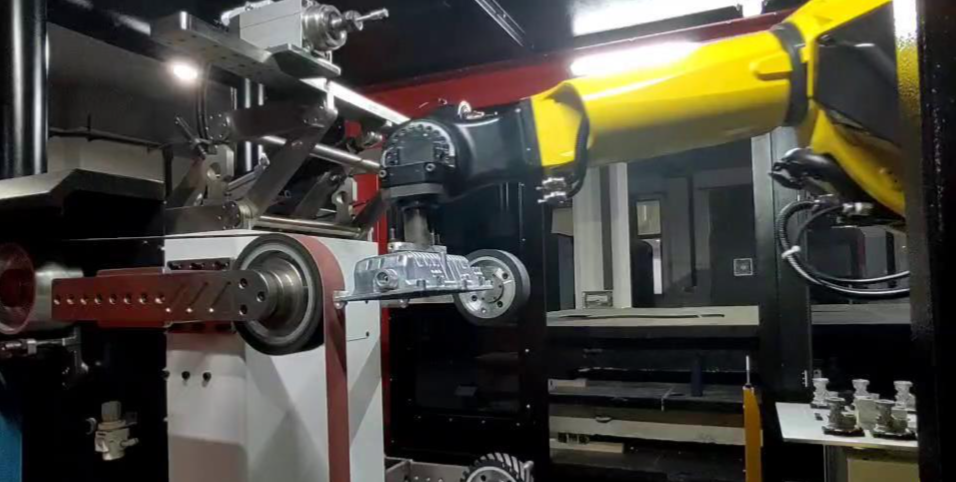
The tool is fine, right? Then let’s look further up— the problem might be with the “arm.”
1. Check the “robot posture”
This is the most fundamental robotic-side issue—the “singularity.”
When the robot reaches certain specific postures—for example, when the J4 and J6 axes are aligned in a straight line, or when the J2 and J3 arms are fully extended—its “rigidity” becomes extremely poor, akin to having an “elbow locked,” making it unable to resist impact forces from certain directions.
Avoid sanding near singularities!
Adjust the positioning of the workpiece, or adjust the robot’s mounting base.
Rule of thumb Try to keep the robot’s “elbow” (J3 axis) bent as much as possible, and avoid straightening J2 and J3. When sanding, keep axes J4 and J6 as far away from the “0-degree” position as possible.
2. Check the “robot installation base.”
You wouldn’t mount a cannon on a canoe. Similarly, if your robot is mounted on a “flimsy” steel frame or a wobbly base, it’s essentially equipping itself with its own “springs.”
Measures The robot base must be extremely stable. Thick steel plates, grouting, and locked-down anchor bolts are standard features. If you can feel any shaking when you give the robot base a firm push with your hand, it must be reinforced.
3. Check the “Robot Rigidity Selection”
This is an “inherent problem.” Are you using a “collaborative robot” with a 5-kg payload to tackle a “heavy-duty” task that requires a grinding force of 100 N? Robots with small payloads and light self-weights inherently have weaker arm rigidity, making them more susceptible to being “driven off course” by excitation forces.
Measures This is a selection mistake. If it’s already impossible to make changes, the only option left is to return to “Path One”—significantly reduce your process parameters (rotational speed, feed rate, and force), sacrificing efficiency in exchange for stability.
Path Four: Workpiece and Fixture—Check Your “Opponent”

Finally, we inspect the object being processed. Sometimes, it’s not you who’s “shaking”—it’s the object itself that’s “shaking.”
1. Check “Workpiece Clamping”
“The cantilever beam” is the source of vibration. Is your workpiece clamped only at one end, while the grinding area is on the other end (the unsupported end)? Of course, as soon as you touch it, it’ll “tremble” like a diving board.
Measures Add support! Below or near the grinding area, add auxiliary clamping points or support points to make the workpiece more stable.
2. Inspect the “workpiece itself” (thin-walled parts)
If what you're grinding is a thin metal sheet or a hollow structure (such as a sink or an oil pan), these “thin-walled components” inherently have extremely poor rigidity and are “naturally” prone to vibration.
(Optimal) Design a “form-fitting fixture” for it—such as a resin or low-melting-point alloy—that completely conforms to its interior, transforming it into a “solid” structure.
(Suboptimal) Use the ultra-soft process (low speed, low pressure) from “Path One.”
3. Check “Fixture Rigidity”
Is the fixture’s design itself flimsy? Was it assembled from just a few thin metal sheets?
Measures The fixture’s design must be as stable as a mountain; it’s just as important as the robot’s base.
Ask
What if none of the above works?
Option 1: Shift from “passive” to “active”
Are you still using “pneumatic floating”? A cylinder is essentially a “spring-damper” system that, at certain frequencies, will naturally oscillate.
Upgrade: Switch to the “Active Constant-Force End Effector.” This tool is equipped with a built-in force sensor and servo motor. Rather than passively “buffering,” it actively “dampens” vibrations. It can detect the onset of vibrations and adjust its position at millisecond-level speeds to “counteract” them, achieving true “soft and adaptive compliance.”
Option 2: Introduce “variable-frequency” thinking
If a certain rotational speed causes vibration, then I’ll… Variable speed ”。
Upgrade “Use spindle-frequency modulation grinding.” When grinding along the same path, allow the spindle speed to vary dynamically and randomly within a narrow range. Since resonance requires a “stable” excitation frequency, I’ll simply deny you that “stability,” thereby disrupting the very formation of resonance at its source. This requires advanced functionality from both the controller and the spindle.
Option 3: Use a “vibration-damping handle/tool”
In the field of CNC machining, there is a specialized “ Vibration-damping boring bar/tool holder They have specialized damping structures inside that can “absorb” vibrational energy.
Upgrade Look for “vibration-damping grinding heads” or “vibration-damping connectors” that are suitable for robotic polishing, and connect them in series between the robot and the tool.
Conclusion
There’s no “one-hit wonder”—only “systems thinking.”
There’s never been a single, foolproof solution to the “vibration marks” issue caused by robotic polishing.
It’s a systems engineering endeavor—a result of the synergistic interaction among four key components: “process,” “tools,” “robots,” and “workpieces.”
Please save this guide. The next time you spot those annoying moiré patterns, don't panic—start with “Path One” and go through each step one by one.
Latest News



Contact Information


208 Tangzhisha Road, Xinjie Street, Xiaoshan District, Hangzhou City

sweep
Focus on us